Transcribe Zoom, Google Meet and Teams with speaker diarization, webhooks, provider choice, real-time streaming and bring-your-own-key support.
Building meeting transcription involves two separate systems: capturing audio from the call, then sending it through speech-to-text. Meeting BaaS handles both through one API for Zoom, Google Meet and Microsoft Teams, providing signed URLs in completion webhooks to retrieve available transcript artifacts.
What is the Meeting BaaS API?
Our Meeting Bot API allows you to record and convert speech to text for Google Meet, Zoom, and Microsoft Teams meetings using one simple curl command.
Transform your video meetings into searchable, analyzable text data with enterprise-grade accuracy and speed.
Core Capabilities
The Meeting BaaS API provides a complete solution for capturing and analyzing meeting content:
- Multiple batch providers: Gladia, Deepgram, AssemblyAI, Speechmatics and Soniox
- ElevenLabs support for real-time streaming, alongside the batch providers
- Speaker-labelled utterances with timestamps in a standardized output format
- Meeting chat and participant metadata alongside recording artifacts
- Bring your own provider key on every plan
- Raw provider output and a standardized transcript format
Gladia is the default provider. You can select another supported provider per bot, pass provider-specific options, or use your own key to control provider billing and configuration.
API Capabilities
Accuracy depends on provider, language, audio quality and vocabulary. Test providers with representative calls instead of relying on one universal accuracy score.
Provider Choice
- Choose the speech-to-text engine that best fits your languages and latency requirements
- Keep one Meeting BaaS bot and webhook integration while changing transcription providers
- Use provider-specific vocabulary, language detection and formatting options through
custom_params
Advanced Features
- Custom Vocabulary: Add industry-specific terms or names to improve transcription accuracy
- Timestamps: Word-level timestamps for precise audio-text synchronization
- Noise Reduction: Advanced algorithms to filter out background noise
- Format Options: Receive transcripts in plain text, SRT, or VTT caption formats
- Code-switching: Accurately transcribe conversations where multiple languages are used interchangeably
- Translation: Convert spoken language into written text in any of the 99 supported languages
Automate Meeting Workflows
Using the Meeting BaaS API, you can set up automations to extract information from video meetings into the database of your choice, be it an end-user database such as Notion or Airtable, or a more robust solution like PostgreSQL.
As we handle getting the data, and also optionally transcribe your meetings, you're just one API call away from an LLM to structure the data, extract meaning, and store it.
Create a Transcribed Meeting Bot
Create one bot with transcription enabled. Its bot.completed webhook supplies signed artifact URLs, not the transcript body. Check that data.transcription is not null, download the transcript before the URL expires, then route the downloaded content into Notion or another database.
Our API makes it simple to integrate with Notion for automated meeting documentation:
// Example: send a bot and enable transcription
const response = await fetch('https://api.meetingbaas.com/v2/bots', {
  method: 'POST',
  headers: {
    'x-meeting-baas-api-key': process.env.MEETING_BAAS_API_KEY,
    'Content-Type': 'application/json'
  },
  body: JSON.stringify({
    meeting_url: 'https://meet.google.com/xxx-yyyy-zzz',
    bot_name: 'Notetaker',
    transcription_enabled: true,
    transcription_config: {
      provider: 'gladia'
    }
  })
});
Make + Airtable Integration
Leverage Make (formerly Integromat) and Airtable to create a powerful automation workflow for your meetings.
Create sophisticated automation workflows that trigger on new meeting recordings and process data with AI services.
Workflow Steps:
- Set up a Make scenario to trigger on new meeting recordings
- Use Meeting BaaS API to retrieve meeting data and transcriptions
- Process the data with AI services for summarization and insights
- Automatically update Airtable with structured meeting information
Getting Started
Get Your API Key
Sign up for a Meeting BaaS account and obtain your API key from the dashboard.
Choose Your Integration
Decide whether you want to use our meeting bots for automatic recording or integrate directly with our transcription API.
Make Your First API Call
Use our simple curl command to transcribe your first meeting and receive structured data.
Set Up Automation
Configure webhooks and integrations to automatically process new meetings as they're recorded.
Scale Your Implementation
Deploy your solution and scale it to handle multiple meetings and users across your organization.
API Usage Examples
Basic Meeting Data Request
curl -X POST https://api.meetingbaas.com/v2/bots \
  -H "x-meeting-baas-api-key: YOUR_API_KEY" \
  -H "Content-Type: application/json" \
  -d '{
    "meeting_url": "https://meet.google.com/xxx-yyyy-zzz",
    "bot_name": "Notetaker",
    "transcription_enabled": true,
    "transcription_config": {
      "provider": "gladia"
    }
  }'
Bring Your Own Provider Key
curl -X POST https://api.meetingbaas.com/v2/bots \
  -H "x-meeting-baas-api-key: YOUR_API_KEY" \
  -H "Content-Type: application/json" \
  -d '{
    "meeting_url": "https://meet.google.com/xxx-yyyy-zzz",
    "bot_name": "BYOK Notetaker",
    "transcription_enabled": true,
    "transcription_config": {
      "provider": "deepgram",
      "api_key": "YOUR_DEEPGRAM_API_KEY"
    }
  }'
Does the API support speaker diarization?
Yes. The standardized output_transcription.json represents utterances with start and end timestamps, text and speaker fields. The per-utterance language field is optional when the provider does not report it. Handle missing optional fields when parsing the transcript.
In the bot.completed webhook, data.transcription and data.raw_transcription are signed download URLs, not inline transcript data. Either URL can be null when the artifact is unavailable or has been deleted; raw provider output is not guaranteed. These URLs expire four hours after generation. Check for null before fetching, and download and store any required artifacts promptly, before expiry, for downstream integrations.
Batch vs real-time meeting transcription
Batch transcription runs after recording and is best for searchable archives, summaries and structured extraction. Real-time transcription streams text while the meeting is happening, which suits live captions and interactive agents. Meeting BaaS supports both paths; real-time provider parameters differ from batch parameters, so configure them separately.
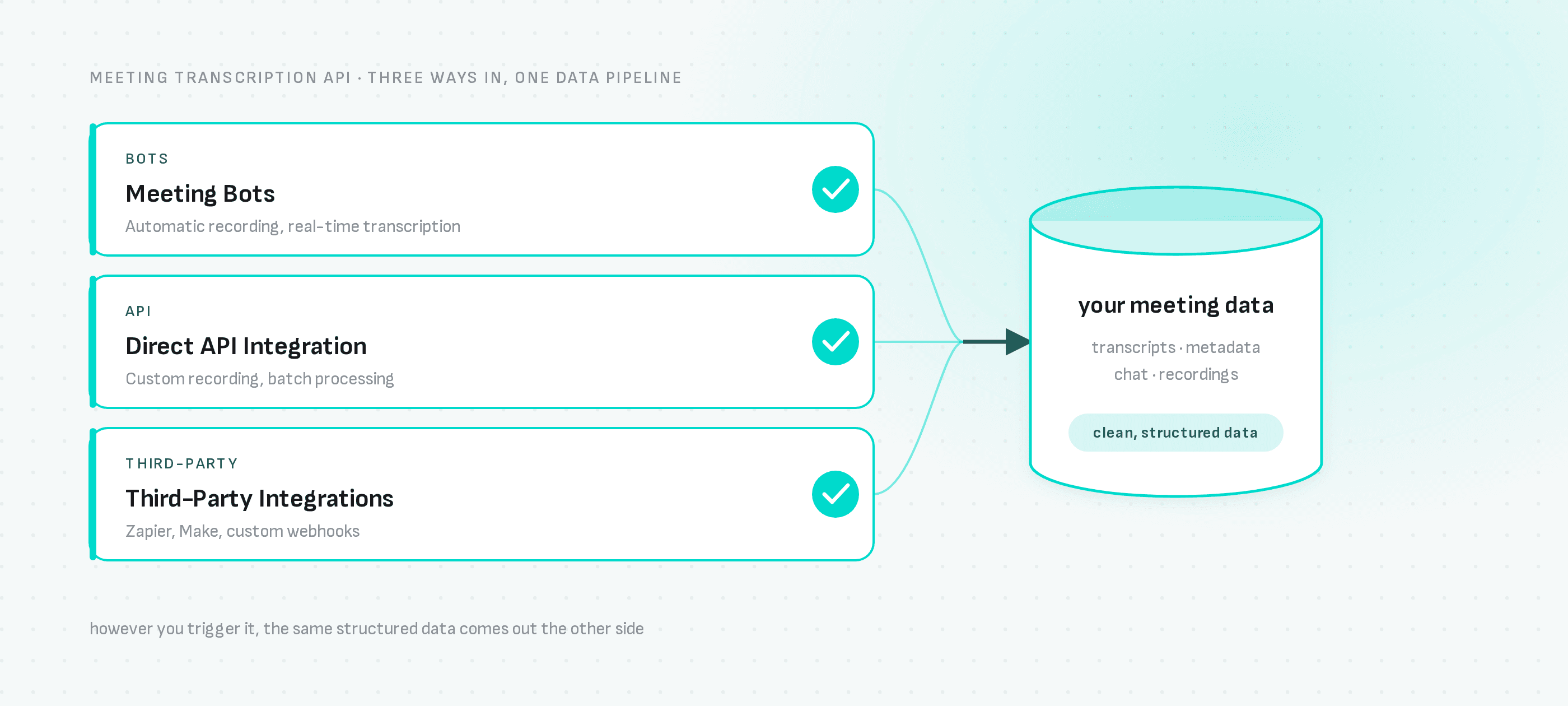
Integration Options
Meeting Bots
- Automatic recording for scheduled meetings
- Real-time transcription during live meetings
- Multi-platform support (Google Meet, Zoom, Microsoft Teams)
API and Webhook Integration
- One create-bot endpoint across Zoom, Meet and Teams
- Bot lifecycle webhooks for status, completion and failure
- Time-limited artifact URLs for raw and standardized transcript output
Third-Party Integrations
- Make/Integromat for workflow automation
- Zapier for app connections
- Custom webhooks for any application
Pricing and Plans
Development
- Free tier for testing and development
- API documentation and examples
- Community support
Production
- Pay-per-use pricing model
- Enterprise features and SLA guarantees
- Dedicated support and custom integrations
Real-World Applications
Common applications include:
- AI note-taking with searchable, speaker-labelled transcripts
- Live captions and interactive agents through real-time streaming
- Knowledge management using transcripts stored in your own database
- Workflow automation triggered by completion webhooks
- Domain-specific transcription using custom vocabulary and provider options
Next Steps
Ready to start transcribing meetings with our API?
- Get your API key and start building
- View API documentation for detailed guides
- Explore examples on GitHub for integration patterns
- See the meeting bot API overview for platform-specific guides
- Contact our team for enterprise solutions
The Meeting BaaS API transforms how you work with video meetings. From simple transcription to complex automation workflows, our platform provides the foundation you need to build powerful meeting intelligence applications.
Have questions about implementing meeting transcription in your application? Our team is here to help you get started.